Use cases in the ScreenshotOne playground

Having documentation and code examples is great, but not enough to allow developers to quickly integrate the API and assess all available features of the ScreenshotOne API.

Changelog1 min read

Written by

Dmytro Krasun

Published on

That’s why ScreenshotOne’s playground was upgraded to support the most often used product use cases.

You can render static, scrolling screenshots, videos, and PDFs right from the playground from today and just copy and paste working code examples.
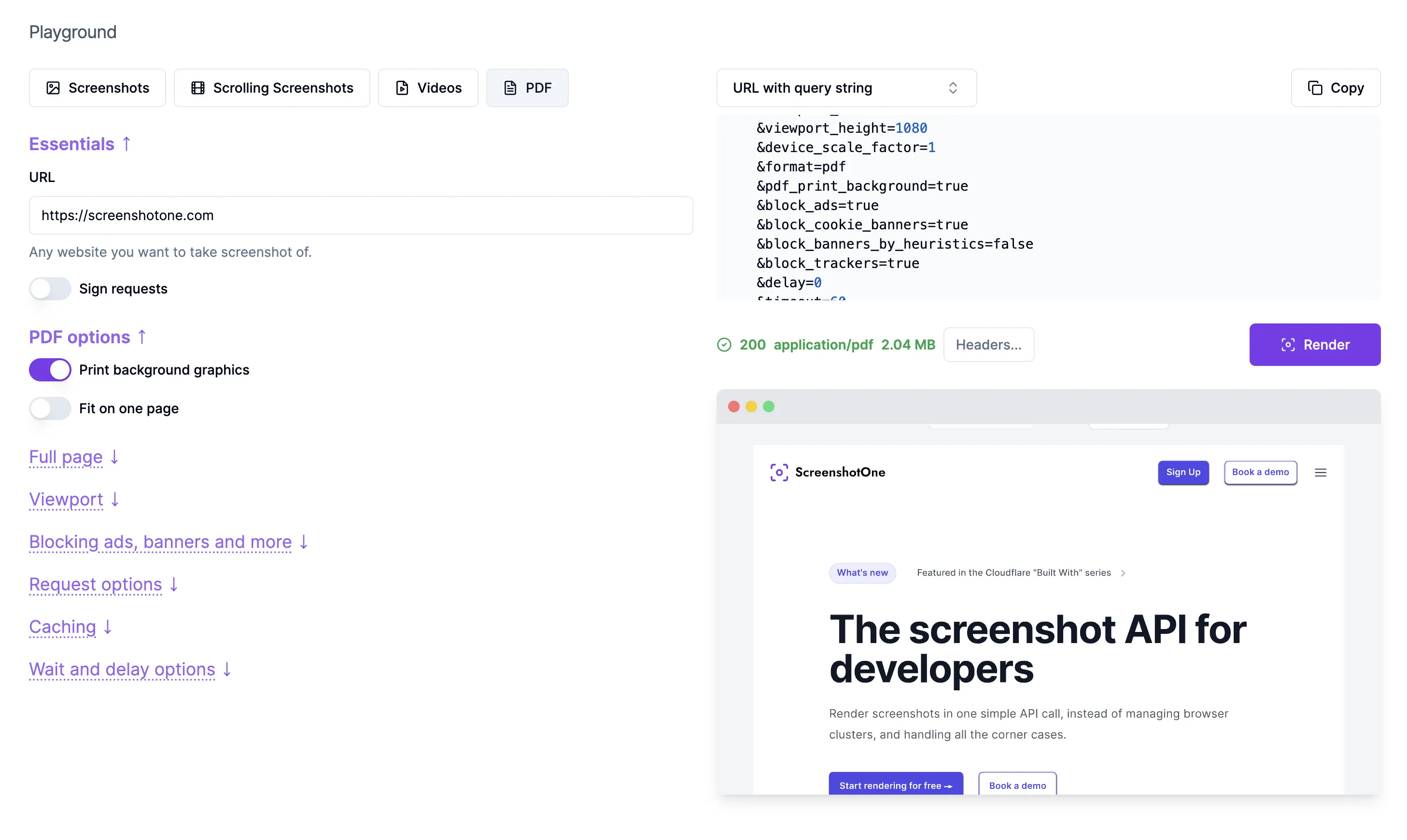
Playground

There are many more use cases. But let’s start with these ones and add more on the go.

Enjoy!

Read more product updates

New features, bug fixes, and optimizations...

View all product updates
Manage your password from dashboard settings

Manage your password from dashboard settings

You can now set, change, or reset your password directly from the dashboard settings.

Read more

1 min read

Improved failed request detection

Improved failed request detection

The fail_if_request_failed option now detects matching HTTP 4xx and 5xx responses in addition to browser-level network failures.

Read more

1 min read

ScreenshotOne is available on Pipedream

ScreenshotOne is available on Pipedream

Automate website screenshots, HTML as images, Markdown as images, PDFs, scrolling screenshots and videos in Pipedream.

Read more

1 min read

Automate website screenshots

Exhaustive documentation, ready SDKs, no-code tools, and other automation to help you render website screenshots and outsource all the boring work related to that to us.