Clearer usage limits and upgrade actions

Clearer usage limits, more links to Billing, and easier plan comparison.

Changelog1 min read

Written by

Dmytro Krasun

Published on

We improved how the dashboard communicates usage limits and the available next steps.
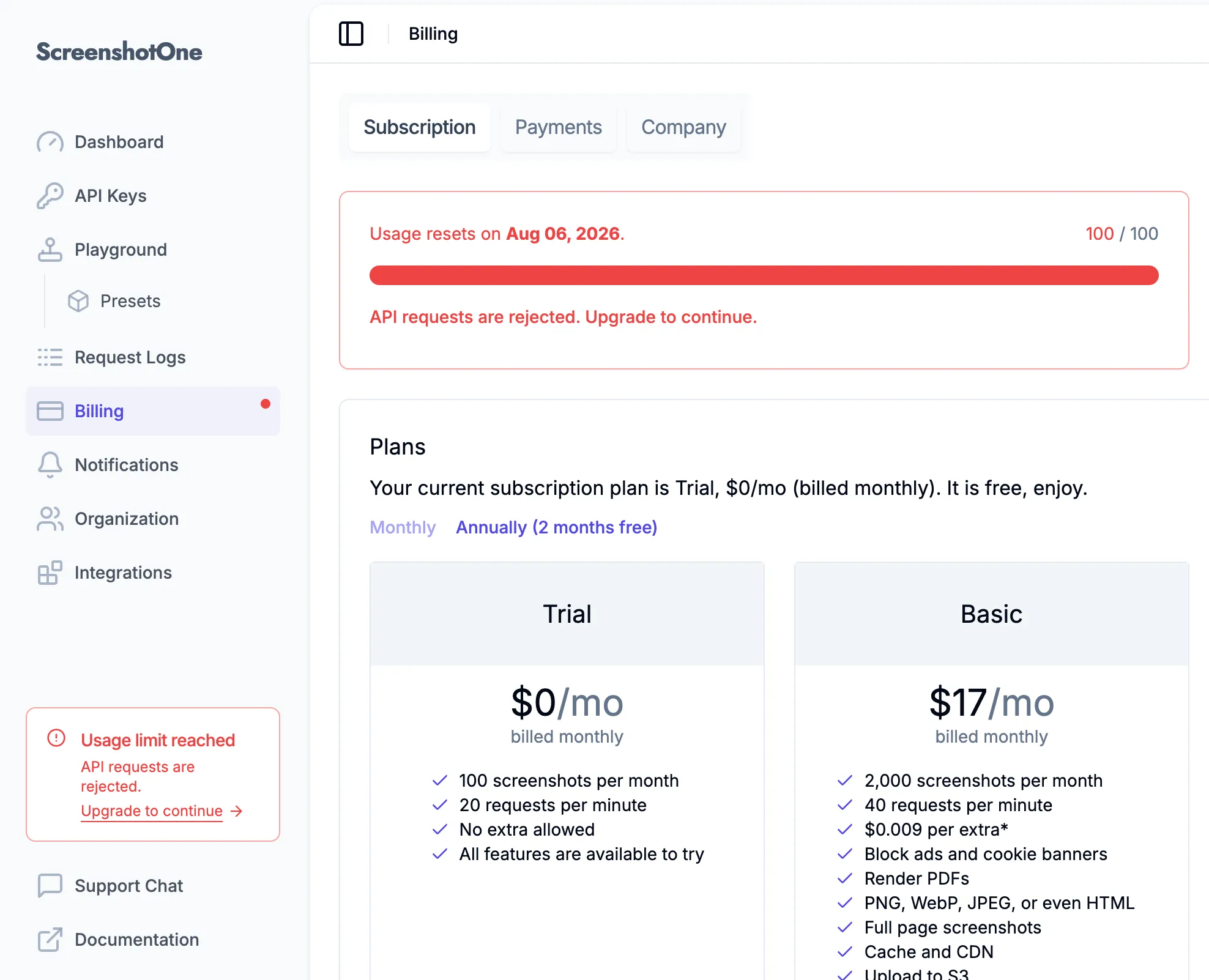
Clearer usage limits and upgrade actions in the ScreenshotOne dashboard

When you approach or reach your hard limit, the usage card and sidebar now show a clearer status and link directly to Billing. If the limit is reached, the dashboard clearly indicates that new API requests are rejected.

Free plans are prompted to upgrade. Paid plans that support extra usage can increase the hard limit or choose a higher plan. Email and Slack usage notifications now provide the same guidance.

We now highlight a recommended plan to make comparison easier. The recommendation is based on the features and usage levels that suit many customers, but the right plan depends on your specific needs.


Read more product updates

New features, bug fixes, and optimizations...

View all product updates
Get favicon used by a website with ScreenshotOne API

Get favicon used by a website with ScreenshotOne API

Now you can get favicon used by a website with ScreenshotOne API in just one simple API call.

Read more

1 min read

Fixed full page screenshot stitching above max height

Fixed full page screenshot stitching above max height

We fixed full page screenshot stitching so the final image respects `full_page_max_height` more reliably, even when pages report incorrect scroll height.

Read more

1 min read

Added a "copy page" button in documentation

Added a "copy page" button in documentation

You can now copy the page content as Markdown for LLMs and more.

Read more

1 min read

Automate website screenshots

Exhaustive documentation, ready SDKs, no-code tools, and other automation to help you render website screenshots and outsource all the boring work related to that to us.